
Introduction
AlipayHK provides a SKU Exposure Solution that enables merchants to reach AlipayHK wallet users through a built-in traffic entry point within the wallet. Merchants synchronize their SKUs to AlipayHK via the Content Synchronize API, making products visible to users in designated in-app areas.
 How It Works
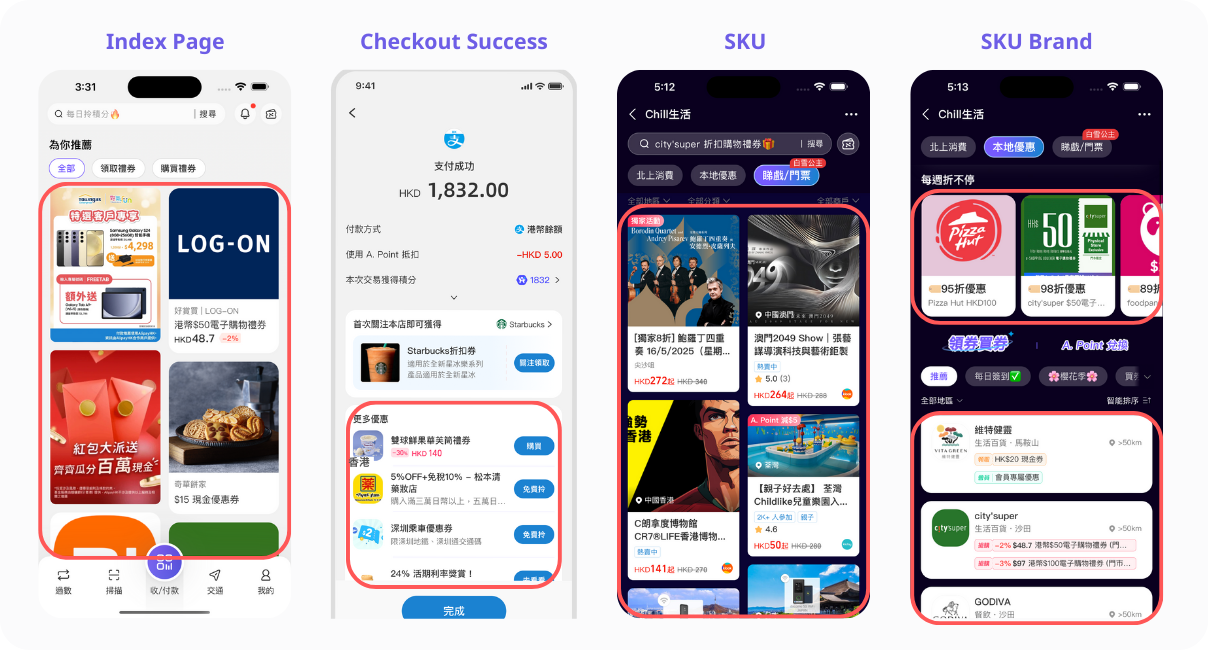
The solution follows a traffic-redirect-deliver model:
copy
AlipayHK Wallet (traffic entry point)
    ↓ User clicks SKU
Merchant Mini-program (for user purchase)- Content Synchronization — Merchants call the Content Synchronize API (
api/open/alipay/v1/content/synchronize) to push SKU information to AlipayHK, including product name, images, price, categories, and alinkUrlpointing to the merchant's mini-program page. - Traffic Entry & Display — AlipayHK displays the synchronized SKUs in designated in-app areas (e.g., Lifestyle tab) to wallet users. The
exposurefield controls visibility (exposed/hidden). - User Click → Merchant Mini-Program — When a user clicks a SKU, AlipayHK redirects them to the merchant's mini-program page via the
linkUrl(starts withalipayhk://) to place an order. - Merchant Payment & Delivery — The user completes the order and payment within the merchant's mini-program, continuing the merchant's own payment flow. The merchant then delivers the product to the user.
Key Benefits
- Traffic Acquisition — Merchants gain exposure to AlipayHK's active user base through in-app display areas, without needing to build their own user acquisition channels.
- Seamless Redirect — Users tap a SKU and land directly on the merchant's mini-program order page — no intermediate pages, no context switching.
- Merchant-Controlled Flow — The merchant owns the entire order and payment process; AlipayHK serves purely as the traffic entry point.
- Flexible Content Management — Merchants can create, update, and toggle SKU visibility (
exposure) in real time via the same API, controlling availability based on stock or promotions.
Getting Started
- Obtain credentials — Contact AlipayHK to receive your
merchantAccountId(starts with2160),clientId, API signing key, endpoint. - Implement signature — All requests must be signed; see API Structure.
- Synchronize SKUs — Call the Content Synchronize API with your product details.
- Set exposure — Toggle
exposuretoexposedto make SKUs visible to users. - Handle redirect — Ensure your mini-program page (linked via
linkUrl) can receive users and process orders through your own payment flow.